Search This Blog

Thursday, December 2, 2010

How to be Controlling

During the project I mentioned last posting, the C# expert created several custom controls using COBOL which we used on the various WinForms in the application.  I myself have never done anything with user controls and since I haven't seen it written up anywhere else, I thought this would make for a good topic for discussion.   How do you create a custom control using COBOL?

Yep.  I'm glad you asked *smile*

Instead of starting from scratch, I figured the right approach would be to capitalize on work done by others.  And by taking that approach, I found an article at http://knol.google.com/k/creating-custom-controls-with-c-net# which made my job easy.  The article spells out how to create a custom progress bar for your application.  Seems like something useful huh?

 
Before I get started, let me make it clear that I’m not going to go into all the details on custom controls in this article. You can find more information in much greater detail and deeper understanding than anything I could write (in the referenced article for one).  I’m going to spend my time on recreating the same control Dave (the original author) outlined in his post.  The difference is that I’ll be using Micro Focus Visual COBOL and Visual Studio 2010. So, print out Dave’s directions and follow along with me while I highlight the differences.
 Getting Started
First I created the same project using the same name, but instead of C#, I selected to create a managed COBOL Windows Forms Application (didn't want to strain too much by thinking too hard too soon of course).

 
Next, just like Dave, I added a new project to the solution and call it “ProgressBar”, making sure to select managed COBOL Class library as the template.
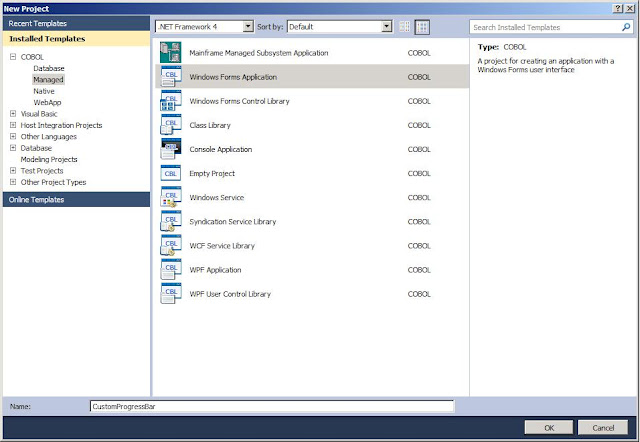
 I then added the reference to the new project as directed and was ready to create the control.   As with the C# example, Visual COBOL created a shell class program for me to use as a base. And as in the example, I deleted it because I wouldn’t be using it.

 From the Solution Explorer, I selected the ProgressBar project and right clicked to Add a new item, selected “User Control” from the menu and named it “ProgressControl”.  

  Once the user control was created, I set the properties as Dave had them:

  •  BackColor: Window
  • BorderStyle: FixedSingle
  • Size: 148, 14
  • Double-Buffered: True
As for the Code
Since I used COBOL, you’ll notice the code behind page that was created for the ProgressControl is very similar to the C# version.

Next, I added the code to allow for the choosing of a foreground color for the progress bar  and added the “System.Drawing” namespace to the program so that I didn’t have to fully qualify things like “System::Drawing::Color” in my COBOL code. I just want to type “Color” same as Dave did in the C# routine. To do this, I typed the appropriate $set statement at the top of the program. While I was there, I also added a line for “System.Windows.Forms” because we’ll need it later.

You’ll also see I added the variable definition to the working storage section for barcolor.  In the original C# example, Dave typed:
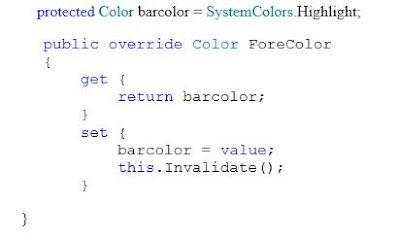
The biggest difference is that I had to write a bit more code for the get and set methods than what the C# had. Not much, but I had to spell out each method, along with its own working storage, procedure division, etc.

 
Once that portion was coded, I had to make a slight change to the code to create the Value property. Because Value is a reserved word in COBOL. So, instead of using “Value” as a variable name, I used pvalue. I placed the the working storage definition directly after the definition for barcolor (see above).

I used COMP-1 because this is the COBOL equivalent of a short Float.  And as with the ForeColor get and set methods above, I wrote the two methods to do what the C# code does:


 Again, you’ll notice that I used COMP-1 when defining the field that is to be used as a short Float. The last bit of code looks like this:

Two items may stand out here. The first is the invoke statement “invoke super::OnPaint(e)”. Simply put, C# uses the keyword “base”, while COBOL uses “super” to refer to the original superset or base version of the method. Dave’s article points out that this particular statement is optional in his simple example but recommended for more complex paint routines. If I had used “self” instead of “super”, the code would be referring to the current version of the method (the code shown above). That would cause a recursive loop where every time the method was called, the first thing it would do is call itself. That situation ultimately consumes the memory of the machine (guess how I know *smile*) causing Visual Studio to abend.

 
The second item which may stand out in this piece of code is that in the C# example, Dave used “Int” to remove the decimal values from the resulting calculation. Instead of dealing with that, I just created a width field with no decimal value. Everything else, I followed the directions provided by Dave. And much to my surprise it worked first second  third time I hit the run button.

Of course I left out all the mistakes I made trying to decipher the C#, but I never claimed to be a C# programmer now did I? That’s what I call my buddy Mike for.  *smile*

Hopefully you find this of interest / value.  If you find any errors in my code or suggestions on how to make this better, by all means, please share!  All contributions greatly appreciated!

Wednesday, October 20, 2010

C# Expert Makes COBOL.Net Scream

This week I'm spending time working with a C# expert on a COBOL modernization project.  What's interesting is that this individual is using his knowledge of C# to re-architect an existing COBOL application, and the results will still be COBOL. 

While I'm admittedly a novice on the ins and outs of .Net, he's extremely strong in both the framework and object oriented design.  Combine his know-how and a basic education on COBOL.Net and in less than two weeks, we've converted the application front end to Winforms and tied it to the existing COBOL business logic.

Why is this interesting?

This proves that your company can give your COBOL developers and your .Net developers a tool like Micro Focus Visual COBOL, a week of basic education on COBOL.Net and ...

TA-DA!

You can get the best of both worlds.  You get a group who knows both Microsoft .Net and COBOL who now have the basic ingredients to begin modifying your COBOL applications to fit your current corporate IT direction.  Comingle the groups and the technologies and you'll get several things:
  • A brand new application based on tried and true application source leveraging an industry standard framework.
  • A energized team of people educated in both your mission critical applications and the framework you've adopted as your corporate direction.
And the team will really enjoy doing it.

Huh?

Yep.  I've seen it this week.  People who want to be involved are stopping by every single day asking for details and wanting to know how they can help.  This includes folks from both sides of the development shop!  Those already on the team are having fun doing something they never thought could be done.

It's true.  Put developers to work breathing life into these systems and they will enjoy the work.  Developers like a challenge and cool tools.  Both sides of the team will become immersed in learning their parts of this "new world" and the religious battle about languages will become secondary to the mission.  Each group will use the tools and language that meet their particular needs and you will get an application which is based on the tried and true applications which have been running your business.

Don't believe me?  Give it a test drive.  Put your own team together, mixing folks from both sides of the fence and give them the basic goal of bringing an existing COBOL application forward to the .Net world.  Add in some education / guidance and see what happens.  Let me know the results!

Sunday, October 10, 2010

ASP.Net, ADO.Net and COBOL - The Right Tools for the Job

Hey folks,

In working on learning how to write a web application using COBOL, I thought it would be interesting to understand how to retrieve a BLOB (binary large object) using ADO.Net and display it back to the user.

So, armed with a downloaded copy of the AdventureWorks database from Microsoft's website, I set about to create an ASP.Net page and its corresponding "code behind" page (out of COBOL of course) to do just that. 


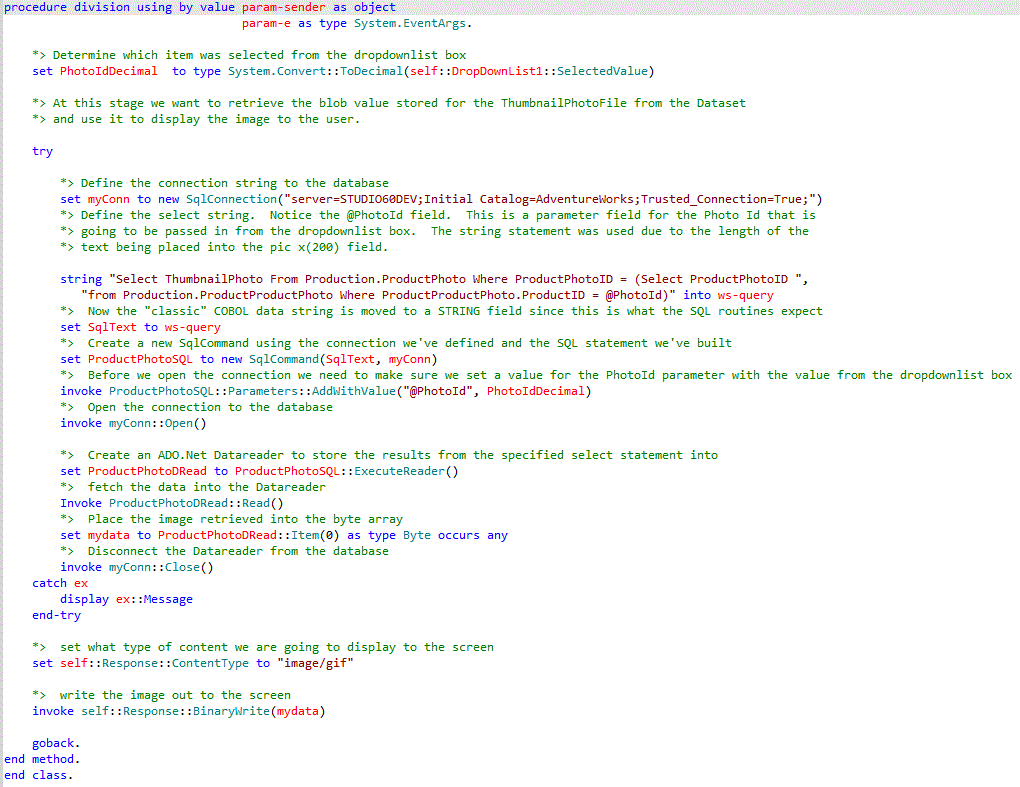
First off, you'll see from the ASP.Net page in the image above that I'm populating a drop down list box with data from one of the tables in the database.  Once the user selects a row from the list, the code behind page launches the "Fetch_ProductImage" method defined within my COBOL program (to see the complete images you may have to click on them to make them full screen).


The image above shows the various objects I had to define using some of the "new" data types I mentioned in an earlier post to this site.  Addittionally, you'll see that I define objects based on the ADO.Net class.  How I use them is shown below in the  method "Fetch_ProductImage".  This is used to grab the image stored within the BLOB field for the selected item:


Once selected the image is displayed to the user via the web browser.  Pretty slick huh?

It's much like using cursors with traditional SQL, with many of the same steps.  In traditional SQL, you define the cursor, open the cursor, read the row(s), then close the cursor.  Similar thing with the data reader.  You define the statement you wish to execute against the table, open the data reader, load the data reader with the rows you wanted, read the row(s) from the data reader, close the connection.  Very similar processes.

One interesting difference I've found is that with a data reader, the rows are stored as "read only".  With traditional SQL you can choose to update the rows contained within the cursor.  But within a data reader, the data can't be modified.  And as I believe is true with a cursor, you can only read forward with the data reader.  Once you have read the row, the previous row is no longer available to you.

There are several other interesting things you can do with ADO.Net.  Just to give you an idea... Everything above was based on examples in the first 50 pages from a 585 book I bought on ADO.Net.  Yes it was written for a VB.Net developer, but I was able to translate it from gibberish into COBOL easily enough *grin*.

Overall it wasn't too difficult. Yes, I know I didn't go into details on how to do all the steps involved with the web form portion of this.  That was because I figure that was the easier part and you too can pick that up from a good book on building ASP.Net web pages.  As I mentioned in a previous post, I've been working from Imar's book "Beginning ASP.Net 4 in C# and VB".  As to the rest, it is all shown above in the COBOL example.  There's surprisingly not that much to it huh?

I hope this was of value for you.   Drop me a note if you have any questions or comments.  I'd love to hear from you!

Sunday, August 15, 2010

Mind The Gap

Once upon a time, I was told that Cobol developers couldn't cross the gap to learn that "object oriented" stuff.  Why can't we? Could it be that we aren't smart enough? 

I think not.

I believe it has to do with the combination of syntax and methodology.  Let's face it, Object Oriented Cobol syntax from the 2002 standard is confusing.  Too many quote characters cluttering things up is my opinion.  Additionally, to use it, there was this object oriented approach to program design we were supposed to learn.  And because we had to learn a new language and we were coming from a procedural-based frame of reference, it stumped us.  I think we were trying to learn too many new things at once.

*cue creepy music*

I have a secret...

For the last couple of weeks,  I've been working secretly in my lab deep beneath the dungeon cooking something up.

I have been working to come to grips with...


Dare I say it...Cobol.Net and ASP.Net. *gasp*

(Ok, I was in my home office in the basement.  Anyway, back to the story)

I bought a book by Imar Spannjaars titled "Beginning ASP.NET 4 in C# and VB", and I had this thought... I wondered if I could translate what Imar was trying to teach the VB  and C# crowd into Cobol.Net syntax.  Guess what?  You can.  *smile*

First off, I've discovered that the new syntax the Micro Focus development guys have put together has made it easier for me to translate from VB.Net to the Cobol.Net.

And you want to know what else I found?  The Object oriented approach started to make more sense.  Not just basic sense but the kind of common sense you hope your teenage son finally gets before he graduates college (I keep my fingers crossed). 

I found that for the most part I only had to grasp a handful of concepts and I could write slick web-based ASP.Net applications using Cobol.Net. 

Basically it comes down to the new data types I've mentioned in earlier posts and two "new" statements, Set and Invoke.  For instance, here is how you use the Set statement.


Translation:
 If the HasFile field of the FileUpload1 control on the current web page is true (think of it as an 88 level switch), set ws-filename to the value stored in the FileName field of the FileUpload1 control on the current web page.  If it doesn't, set the text of the UloadSuccessMessage object to "No File Selected. Unable to Upload" and make it visibile to the user.

And guess what?  Invoke isn't much different.


Translation:
call the Redirect routine of the Response "program" that is tied to the current web application and pass it the URL of "Default.aspx?Redirect".

Based on this rather amazing revelation (amazing to me anyways), I've come to the conclusion that yes Cobol programmers can make the leap.

It isn't really that much of a leap actually, but more like a series of small steps. 

Additionally, I believe that C# and VB folks can understand the basics of this new version of the Cobol.Net syntax. 

In the near future, I hope to post the complete source for the web application I've been building and you can see for yourself what I'm talking about.  This stuff ain't rocket science.

Just in case you didn't notice, you too can give this a try.  Download a copy of Visual Cobol for your home machine for 30 days (www.microfocus.com/visualcobol) and give it a shot.  Can't figure out how to do something?  Maybe we can figure it out together.  Consider it a learning experience *grin*

Friday, July 23, 2010

COBOL: Still Learning and Growing


Continuity


I was recently asked about the direction of COBOL and whether or not I believed the language would continue for very much longer. To say I was taken aback by the question would be a serious understatement! I pointed the person to an article I did last year about COBOL not only being everywhere but what it could do. The article was titled “COBOL: It’s everywhere” and can be found at http://www.c-sharpcorner.com/UploadFile/RSM50/EVRYWHR09032009152715PM/EVRYWHR.aspx . Now maybe I’m being rather naïve, but really why wouldn’t COBOL not only continue but grow and adapt? All one has to do is to take a serious historical perspective of the COBOL language and one can see not only continuous enhancements to the language, but continual expansion of the language. Let’s take a quick historical review of COBOL, shall we?

Yes COBOL is old. It’s over 50 years old already. In most cases it’s been around longer than most of the developers working in a given shop. Just because something is old though doesn’t mean it’s still not useful and serving a purpose. We’ve heard the examples before, “Have a credit card?”, “Use a cell phone?”, “Have a house mortgage?”, “Pay income taxes?”… all and many more examples are being ran by COBOL systems in some point in time. Micro Focus asked a reporter once to live a single day without interacting in some manner, shape or form with COBOL and it couldn’t be done. So it may be old, but it’s also very wide-spread and serving us day in and day out without any recognition. Now let’s look at how COBOL has grown through the years.

Evolution

Even though COBOL is old, it has not stopped learning. COBOL has gone through a number of revisions. To set the baseline let’s take a brief look at each of the versions of COBOL and identify the key contributions made to the language starting with ANS COBOL 68 (yes that’s 1968).

  • ANSI COBOL 1968 In December 1960 a COBOL program was successfully compiled and executed on two different platforms without requiring any code changes. This demonstrated the concept of compatibility to the early pioneers and the need to ensure the language remained consistent across multiple vendors. During the course of the next several years however compatibility suffered. The American National Standard Institute (ANSI) set about the task of re-establishing compatibility. COBOL 68 was the first ‘official’ release of the language.


  • ANSI COBOL 1974 This version was considered by many to re-emphasize the need for compatibility. It contained a number of features that were not in the original version.


  • ANSI COBOL 1985 Another revision of the original version with new features. One of the most important was the introduction of structured constructs. This included the inclusion of scope-terminators such as ‘END-READ’ and ‘END-IF’ to name two. This release was geared towards standardized coding techniques.


  • ANSI COBOL 2002 A significant enhancement of the language was accomplished with the 2002 release of the language. Several of the key concepts introduced included National Language support including support for the Unicode character set, user-defined functions, calling conventions to and from non-COBOL languages, framework support (.NET and Java), floating-point, and XML generation and parsing. One would characterize this release as geared towards interoperability.

Let’s look at the above information in a different perspective. The different versions of the language are presented with the key object each version achieved:

ANSI 1968: Language Standardization
ANSI 1974: Language expansion
ANSI 1985: Technique standardization
ANSI 2002: Interoperability

From this we see a progression of maturity in the language beginning with defining a standard manner in which to communicate, to growing in capabilities and finally to enabling communications with others. A logical progression and growth enabling COBOL to become capable of achieving many more tasks than ever imagined by its creators. But yet the perception exists that COBOL can’t do anything more than add numbers together. But what about the question posed earlier, “Will COBOL be around for very much longer?” Well the NEXT standard has been in development for a while and is due to be released for public comment in August 2010.


Continued Expansion


The next standards goals are to continue to expand the capabilities of the language while making it able to interact with the other languages of the day. To that end the following are being proposed for inclusion in the standard
— Dynamic-capacity tables
— Function pointers
— Any-length elementary items
— Increased size limit on nonnumeric literals
— Enhanced locale support in functions
— Support for industry standard floating-point formats and arithmetic, including multiple rounding options
— Structured constants
— Enhanced date and time handling
— Parametric polymorphism, also known as method overloading


If you’d like to follow the process of the standard you can visit http://www.cobolstandard.info/j4/ . We as COBOL developers should be aware of the changes being proposed to the language we work with on a daily basis so that we may be able to adapt our techniques to take advantage of the new constructs in our toolbox.

Awakening


What has to happen though is for the development community world-wide to realize what a valuable asset it has in all this COBOL code floating around the world and what a versatile language COBOL really is. Companies have invested billions of dollars in these systems. They’ve spent years tweaking, tuning, refining the logic to do just what they need. Then someone says “COBOL ain’t cool” and they look at getting rid of it. Why? We can interact with COBOL in ways unheard of before with .NET being a primary example. Let’s wake up and realize the enormous economic investment that has been made of COBOL and instead of trying to replace it, let’s help make it do even more. Look at new platforms for performance gains, look at new frameworks such as .NET for interaction but let COBOL keep doing the job it’s been designed for…making money! Will COBOL be around for another 50 years? Time will tell but with its demonstrated ability to grow, adapt and expand I would bet on it.


Let’s hear what you have to say. Do you code COBOL? Does your company have applications written in COBOL? How are you using it? Are you looking to expand it? Have you or your company considered expanding what COBOL can do to achieve business success?

Thursday, July 1, 2010

The COBOL Version: Going The Way of Jello?

Once upon a time, every customer RFI had a question about the version of COBOL the compiler supported.  That was years ago.  I can't tell you the last time I got that question.  Not only that, I can't recall when the last time anyone cared really.


Why is this?  Have COBOL versions gone the way of gelatin?  Have they blended so much or become so generic that eveyone calls it by the same name, regardless of what version it is?  Name another brand of gelatin.  (Bet ya can't)

Well, one reason I personally never get the RFI question is probably due to the fact that the Micro Focus dialect has become the defacto standard if you are working off the mainframe.  And that just happens to be the toolset I work with.  Yes, it is nice to be with the market leader *grin*.  It does make life easier sometimes.  The only version related question recently was "Do you support Enterprise COBOL?".   Again, this was probably due to this being the version on the mainframe they used.

With these two exceptions in mind, I still don't see why companies have lost interest in the latest version of the COBOL standard.  Ask a shop working with Java and you'll find out quickly if they are on 1.3 or a 1.6, etc.  Same thing with the .Net framework.  I guarantee you'll find out quickly if a company targets  the 2.0 or 3.0 version of the .Net framework.

But the COBOL version?  Maybe my imagination, but it doesn't seem to be that important anymore.

Could it be that everyone lumps every version into the same bucket?  Its all just COBOL right?

As many may or may not know, the last published COBOL standard was released in 2002.  There were a number of items in the 2002 edition related to Object Orientation which truely brought the language into the modern era.  From the notes on the COBOL Standards website, there are references to a supposed release targeted for 2008 which were supposed to move it even further forward.  I wonder what ever happened to that version.  Anyone know?  Why did it die on the vine?  I know for a fact the group still meets and is working on advancing the language.  But why has it remained unpublished?  Isn't it about time a new version was announced?

Oh well, I digress.

What I'm most curious about is your company's conformance to a particular COBOL version or published standard.  What version do you use?  Are there any elements of the 2002 standard that your company uses or conforms to?  Or are they tied to a vendor specific version of COBOL like Micro Focus or Acucorp?


A more basic question...Do you know what is in the 2002 edition of the COBOL standard?  You can find it at the ISO website just in case you were curious...

And one other question before I finish up on the topic.

If a new version of the standard were to be released on the world, what would it mean to you?  To your company?  From what I can see, it would be a safe bet that very little discussion would occur around the subject until somone needed to upgrade their compiler. 

Kinda like the "if a tree fell in the woods, would it make a sound" question. *smile*

With my limited knowledge of what is being discussed by the group, this may ultimately be a bit of short-sightedness if your company uses COBOL but isn't up on the subject.  There may be elements within the standard which would allow your company to save money or do more with the language.

All things considered, how would you propose the guys over at the COBOL Standards Group go about getting your attention?

What needs to happen to bring this to the forefront in your shop?

Just curious.

Wednesday, June 9, 2010

Declarative Sorting Of Dynamically Allocated In-Memory Tables With COBOL

Visual COBOL = Visual Studio COBOL
One of the things COBOL is really good at is data processing.

Its declarative data model makes it second only to SQL for this purpose. Both in Managed COBOL and native COBOL, Micro Focus COBOL can sort an in-memory table just by saying 'sort'. Not only that, a little trick with pointers and the linkage section means that we can sort any sized table and allocate the memory for that table on the fly. Here I am using Visual COBOL (Visual Studio COBOL) to work through these ideas. To do this, I am using an imaginary example of a retail data control system where we have product variants and stock keeping units (skus). Our little program shows how we can sort variant name/sku pairs by the sku number.

What does declarative mean?

Here we simply declare the structure of our table and how it is indexed and can be sorted:

linkage section.
       01 variants occurs 1 to 1000 depending on variant-count
                   ascending key is sku
                   indexed   by jump-start-index.
           03 sku  binary-long.
           03 decr pic x(20).

Because we have put this in the linkage section, we have declared all this but we have not allocated any storage to it yet - that comes later. Now we sort:

sort variants

Now that is the bit I love! Having declared the data and key structure of the table, COBOL knows everything it needs to know about how to sort it. We do not have to call some sort function passing in some functional thing like a lambda or a call back. All that complexity is taken away. We want the table sorted - so we tell COBOL to sort it! If only my kids were so easy to instruct...

How About Pointers And Allocation?

As mentioned, the declaration of the table is in the linkage section. I have also created a working storage item 'mem-ptr' which is usage pointer. This approach means we can use CBL_ALLOC_MEM to assign a block of memory to use for storing our table. The size of the block to allocate is worked out from the size of each record via the "length of" keyword pair and multiplying the result by variant-count. The location of that memory is pointed to by mem-ptr and we can tell COBOL to use it for our table by the statement "set address of variants(1) to mem-ptr". However, COBOL does need to know how big the table is. This is done by using variant-count in the "depending on" clause of the table declaration.

Putting It Together In Visual COBOL

First open Visual Studio:


Then start a new project:


Then pick a native COBOL template:


Take the created source and replace it with the source below:


$set sourceformat(variable)
       program-id. "sorter".

       working-storage section.
       01 mem-ln        binary-long.
       01 mem-flags     pic x(4) comp-5 value 0.
       01 int-bl        binary-long.
       01 mem-ptr       usage pointer.
       01 status-code   pic x(2) comp-5.
       01 variant-count binary-long.
       
       linkage section.
       01 variants occurs 1 to 1000 depending on variant-count
                   ascending key is sku
                   indexed   by jump-start-index.
           03 sku  binary-long.
           03 decr pic x(20).
           
       procedure division.
       
           move 10 to variant-count
       
           set mem-ln to length of variants
           multiply mem-ln by variant-count giving mem-ln
           
           call "CBL_ALLOC_MEM" 
                using     mem-ptr
                by value  mem-ln mem-flags
                returning status-code
           if not status-code = 0
               display    "Failed to get memory"
               stop run
           end-if
           
           set address of variants(1) to mem-ptr
           
           move 1234       to  sku(1)
           move "beans"    to decr(1)
           move 12         to  sku(2)
           move "fish"     to decr(2)
           move 4532       to  sku(3)
           move "cat food" to decr(3)
           move 2342       to  sku(4)
           move "dog food" to decr(4)
           move 1231       to  sku(5)
           move "sauce"    to decr(5)
           move 1254       to  sku(6)
           move "bread"    to decr(6)
           move  999       to  sku(7)
           move "chicken"  to decr(7)
           move    1       to  sku(8)
           move "beer"     to decr(8)
           move    2       to  sku(9)
           move "wine"     to decr(9)
           move  9999      to  sku(10)
           move "tnt"      to decr(10)
           
           sort variants
           
           perform varying int-bl from 1 by 1 until int-bl greater variant-count
               display sku(int-bl) " =- " decr(int-bl)
           end-perform
           goback
           .
       end program "sorter".

Giving this:


Now click in the left margin to put a break point on the "goback":


Now step into the program using the debugger and it will stop on the break point:


We can now see the sorted output!


For more stuff like this - check out the Visual COBOL Knol and The Managed COBOL Knol community sites