Search This Blog

Thursday, May 5, 2011

More Performance!

I was just informed that the upcoming webinar on May 11th being hosted by Micro Focus will be focused on COBOL and performance. And that Alex Turner will be doing the session.

Set your VCR's to record!!!! (ok, truthfully... how many of you still have VCR's? Show of hands. Uh huh. That's what I figured. And they still all blink 12:00 a.m. don't they? *grin*).

To sign up for the session, click here.

May 11th is also my mother's birthday. Happy B-day Ma!!!!

I got you a cake!

Friday, March 25, 2011

COBOL and Speed: A perfect combination

I've been asked a few times in the past if I had any suggestions for "best practices" or "how to write the fastest code possible" when coding COBOL. And I'm almost always stumped for an answer that is beyond one or two sentences.

Well, I'm now in luck.

One of the developers at Micro Focus has posted an article on the community website (http://community.microfocus.com) which covers this very topic.

You can find the article at http://community.microfocus.com/library/articles/84_Coding_for_speed_size_and_portability

In his article, you'll find some pretty good tidbits which will have your code screaming along in record fashion in no time.

Which brings a question to mind...

How often do you review your application source to see if you can make it better? Once in awhile? Never? Only when it breaks?

I once had a programmer who worked for me dig into a rather complex piece of long running code (sometimes upwards of 20 hours). He was able to rewrite the routine and reduce the clock time to less than three minutes on average. No I didn't write it originally *smile*. But it goes to show you that you shouldn't overlook doing a review of the source once in awhile to see if there is a better way to do things now that you are older and wiser.

Just a thought!

See ya.

Monday, March 14, 2011

Datagrids, ADO.Net and Cobol

The last few months have had me focused on an internal project which involves multiple pieces, some of which are Micro Focus products, while others are from partners such as HP, LRS, Syncsort, Microsoft and CA.

And as such, I haven't had much time to dig into using my new favorite tool, Visual COBOL.  That's left me sad *smile*.  To fix this, I spent part of my weekend writing code.  It sure beat raking leaves!  (Ummm... I'll get to it next weekend I promise dear).

One of the things I figured out was how to create an ADO.Net datatable, add fields to it, populate it with data, and tie it to a DataGrid.  It's pretty easy actually.

First thing you do is define a variable in working storage that can hold the definition of the table.


Then in my program I create a new instance of the table and store it in this variable.


And then I added a column to the ADO.Net datatable by first defining a variable in Working Storage that could hold the definition of a column:


And then doing the add like so:


After that, it was just a matter of setting the various properties of the column:


And adding it to my datatable.

Once I had the table defined, I linked the datagrid control I had placed on my Winform to it.


Now that the data table has been defined, it is just a matter of adding some data to it.  To do this, I had to first create a new row in the datatable. 


And then once that was done, I inserted data into that row matching its definition:

The only tough part was figuring out the syntax of adding a row to the table. In VB.Net, the statement would have been:


Trow = Tbl.NewRow()

But as you can see, in Visual COBOL, I had to first set the data type of the field and then add it to the table.  What's an extra statement among friends right? *smile*

The last set statement above uses the Now method of System.DateTime and stores it in the column I created.  The "ToShortDateString" at the end of it allow me to choose the format of the date string being stored into the column.  I could have just as easily accepted the current-date from the system clock and placed it in there.  But I thought I would try the .Net method instead.

Fairly simple.  Once I figured all this out, it didn't take long to expand on things and create something I could toy around with...


 Yes, I know it isn't that impressive, but I now know how to create an ADO.Net data table, populate it and link it to a datagrid.  And so do you by the way *wink*.

And I'm betting neither one of us knew how to do it before you read this.

See, I can learn new tricks *smile*

Tuesday, February 1, 2011

It's All About Community

Micro Focus has recently launched a new community site for those who use the many different tools the company produces.  For those that haven't visited as of yet, click on community.microfocus.com and take a look.  You'll find forums, blogs and articles dedicated to each product area, not just COBOL.

For instance, there are sections on DevPartner, Silk, and i.Sight (Modernization Workbench) and so on and so forth.  Of course the COBOL sections are the best, but then again maybe I'm biased in some way :).

While still in its infancy, I believe it has potential to turn into something rather useful.  I would like to encourage you to post on the site and share your ideas/questions, etc.  I'm a firm believer that you'll only get something out of it if you put something in to it.  Yeah, I said that. *smile*

I've already found a pretty interesting post on the site showing how to do a mail merge using Visual COBOL and Microsoft Word.  Pretty slick stuff and something I've often wanted to do myself.  I wonder what else someone will post?  I'll just have to keep checking back huh? *wink*

Oh well, lunch break is over.  Gotta get back to it.

See ya!

Thursday, December 2, 2010

How to be Controlling

During the project I mentioned last posting, the C# expert created several custom controls using COBOL which we used on the various WinForms in the application.  I myself have never done anything with user controls and since I haven't seen it written up anywhere else, I thought this would make for a good topic for discussion.   How do you create a custom control using COBOL?

Yep.  I'm glad you asked *smile*

Instead of starting from scratch, I figured the right approach would be to capitalize on work done by others.  And by taking that approach, I found an article at http://knol.google.com/k/creating-custom-controls-with-c-net# which made my job easy.  The article spells out how to create a custom progress bar for your application.  Seems like something useful huh?

 
Before I get started, let me make it clear that I’m not going to go into all the details on custom controls in this article. You can find more information in much greater detail and deeper understanding than anything I could write (in the referenced article for one).  I’m going to spend my time on recreating the same control Dave (the original author) outlined in his post.  The difference is that I’ll be using Micro Focus Visual COBOL and Visual Studio 2010. So, print out Dave’s directions and follow along with me while I highlight the differences.
 Getting Started
First I created the same project using the same name, but instead of C#, I selected to create a managed COBOL Windows Forms Application (didn't want to strain too much by thinking too hard too soon of course).

 
Next, just like Dave, I added a new project to the solution and call it “ProgressBar”, making sure to select managed COBOL Class library as the template.
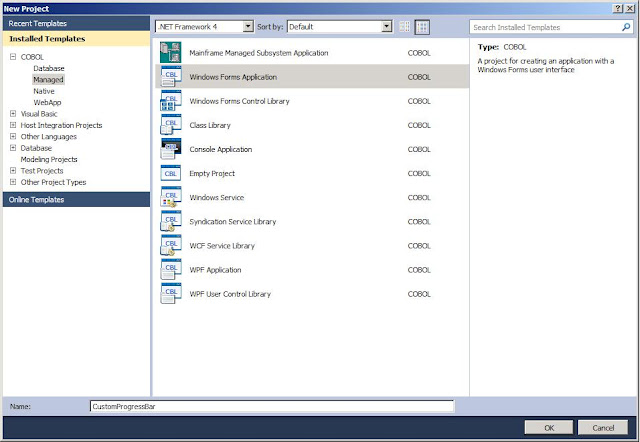
 I then added the reference to the new project as directed and was ready to create the control.   As with the C# example, Visual COBOL created a shell class program for me to use as a base. And as in the example, I deleted it because I wouldn’t be using it.

 From the Solution Explorer, I selected the ProgressBar project and right clicked to Add a new item, selected “User Control” from the menu and named it “ProgressControl”.  

  Once the user control was created, I set the properties as Dave had them:

  •  BackColor: Window
  • BorderStyle: FixedSingle
  • Size: 148, 14
  • Double-Buffered: True
As for the Code
Since I used COBOL, you’ll notice the code behind page that was created for the ProgressControl is very similar to the C# version.

Next, I added the code to allow for the choosing of a foreground color for the progress bar  and added the “System.Drawing” namespace to the program so that I didn’t have to fully qualify things like “System::Drawing::Color” in my COBOL code. I just want to type “Color” same as Dave did in the C# routine. To do this, I typed the appropriate $set statement at the top of the program. While I was there, I also added a line for “System.Windows.Forms” because we’ll need it later.

You’ll also see I added the variable definition to the working storage section for barcolor.  In the original C# example, Dave typed:
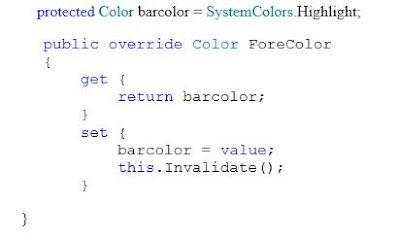
The biggest difference is that I had to write a bit more code for the get and set methods than what the C# had. Not much, but I had to spell out each method, along with its own working storage, procedure division, etc.

 
Once that portion was coded, I had to make a slight change to the code to create the Value property. Because Value is a reserved word in COBOL. So, instead of using “Value” as a variable name, I used pvalue. I placed the the working storage definition directly after the definition for barcolor (see above).

I used COMP-1 because this is the COBOL equivalent of a short Float.  And as with the ForeColor get and set methods above, I wrote the two methods to do what the C# code does:


 Again, you’ll notice that I used COMP-1 when defining the field that is to be used as a short Float. The last bit of code looks like this:

Two items may stand out here. The first is the invoke statement “invoke super::OnPaint(e)”. Simply put, C# uses the keyword “base”, while COBOL uses “super” to refer to the original superset or base version of the method. Dave’s article points out that this particular statement is optional in his simple example but recommended for more complex paint routines. If I had used “self” instead of “super”, the code would be referring to the current version of the method (the code shown above). That would cause a recursive loop where every time the method was called, the first thing it would do is call itself. That situation ultimately consumes the memory of the machine (guess how I know *smile*) causing Visual Studio to abend.

 
The second item which may stand out in this piece of code is that in the C# example, Dave used “Int” to remove the decimal values from the resulting calculation. Instead of dealing with that, I just created a width field with no decimal value. Everything else, I followed the directions provided by Dave. And much to my surprise it worked first second  third time I hit the run button.

Of course I left out all the mistakes I made trying to decipher the C#, but I never claimed to be a C# programmer now did I? That’s what I call my buddy Mike for.  *smile*

Hopefully you find this of interest / value.  If you find any errors in my code or suggestions on how to make this better, by all means, please share!  All contributions greatly appreciated!

Wednesday, October 20, 2010

C# Expert Makes COBOL.Net Scream

This week I'm spending time working with a C# expert on a COBOL modernization project.  What's interesting is that this individual is using his knowledge of C# to re-architect an existing COBOL application, and the results will still be COBOL. 

While I'm admittedly a novice on the ins and outs of .Net, he's extremely strong in both the framework and object oriented design.  Combine his know-how and a basic education on COBOL.Net and in less than two weeks, we've converted the application front end to Winforms and tied it to the existing COBOL business logic.

Why is this interesting?

This proves that your company can give your COBOL developers and your .Net developers a tool like Micro Focus Visual COBOL, a week of basic education on COBOL.Net and ...

TA-DA!

You can get the best of both worlds.  You get a group who knows both Microsoft .Net and COBOL who now have the basic ingredients to begin modifying your COBOL applications to fit your current corporate IT direction.  Comingle the groups and the technologies and you'll get several things:
  • A brand new application based on tried and true application source leveraging an industry standard framework.
  • A energized team of people educated in both your mission critical applications and the framework you've adopted as your corporate direction.
And the team will really enjoy doing it.

Huh?

Yep.  I've seen it this week.  People who want to be involved are stopping by every single day asking for details and wanting to know how they can help.  This includes folks from both sides of the development shop!  Those already on the team are having fun doing something they never thought could be done.

It's true.  Put developers to work breathing life into these systems and they will enjoy the work.  Developers like a challenge and cool tools.  Both sides of the team will become immersed in learning their parts of this "new world" and the religious battle about languages will become secondary to the mission.  Each group will use the tools and language that meet their particular needs and you will get an application which is based on the tried and true applications which have been running your business.

Don't believe me?  Give it a test drive.  Put your own team together, mixing folks from both sides of the fence and give them the basic goal of bringing an existing COBOL application forward to the .Net world.  Add in some education / guidance and see what happens.  Let me know the results!

Sunday, October 10, 2010

ASP.Net, ADO.Net and COBOL - The Right Tools for the Job

Hey folks,

In working on learning how to write a web application using COBOL, I thought it would be interesting to understand how to retrieve a BLOB (binary large object) using ADO.Net and display it back to the user.

So, armed with a downloaded copy of the AdventureWorks database from Microsoft's website, I set about to create an ASP.Net page and its corresponding "code behind" page (out of COBOL of course) to do just that. 


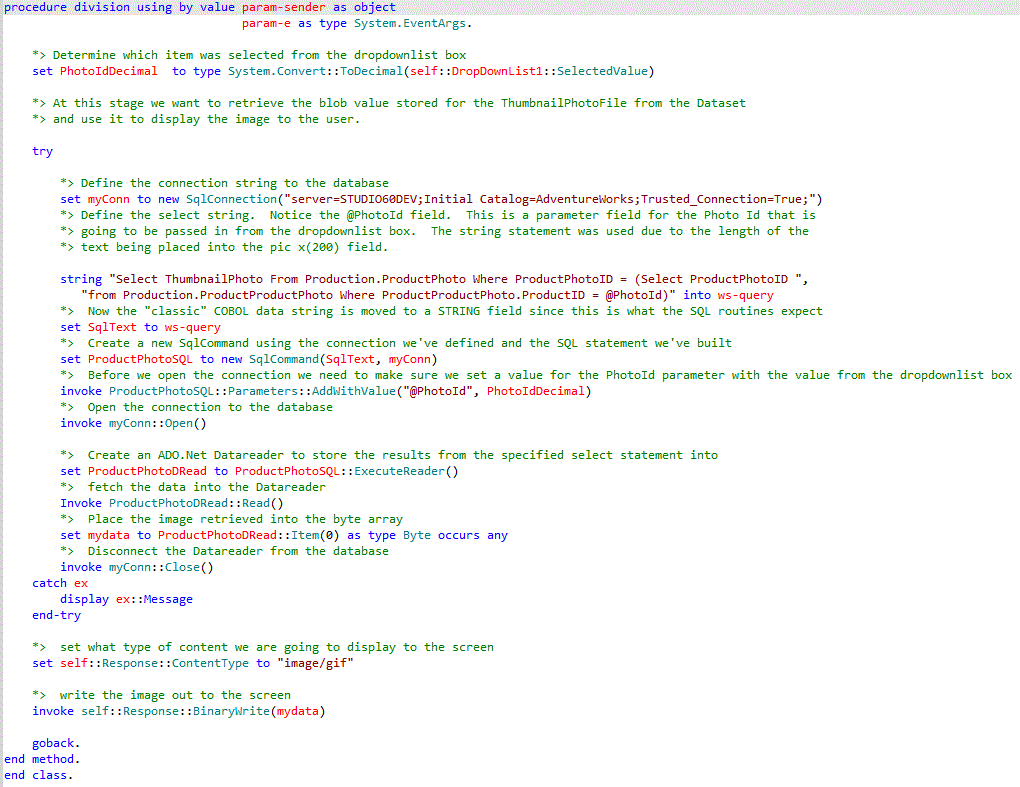
First off, you'll see from the ASP.Net page in the image above that I'm populating a drop down list box with data from one of the tables in the database.  Once the user selects a row from the list, the code behind page launches the "Fetch_ProductImage" method defined within my COBOL program (to see the complete images you may have to click on them to make them full screen).


The image above shows the various objects I had to define using some of the "new" data types I mentioned in an earlier post to this site.  Addittionally, you'll see that I define objects based on the ADO.Net class.  How I use them is shown below in the  method "Fetch_ProductImage".  This is used to grab the image stored within the BLOB field for the selected item:


Once selected the image is displayed to the user via the web browser.  Pretty slick huh?

It's much like using cursors with traditional SQL, with many of the same steps.  In traditional SQL, you define the cursor, open the cursor, read the row(s), then close the cursor.  Similar thing with the data reader.  You define the statement you wish to execute against the table, open the data reader, load the data reader with the rows you wanted, read the row(s) from the data reader, close the connection.  Very similar processes.

One interesting difference I've found is that with a data reader, the rows are stored as "read only".  With traditional SQL you can choose to update the rows contained within the cursor.  But within a data reader, the data can't be modified.  And as I believe is true with a cursor, you can only read forward with the data reader.  Once you have read the row, the previous row is no longer available to you.

There are several other interesting things you can do with ADO.Net.  Just to give you an idea... Everything above was based on examples in the first 50 pages from a 585 book I bought on ADO.Net.  Yes it was written for a VB.Net developer, but I was able to translate it from gibberish into COBOL easily enough *grin*.

Overall it wasn't too difficult. Yes, I know I didn't go into details on how to do all the steps involved with the web form portion of this.  That was because I figure that was the easier part and you too can pick that up from a good book on building ASP.Net web pages.  As I mentioned in a previous post, I've been working from Imar's book "Beginning ASP.Net 4 in C# and VB".  As to the rest, it is all shown above in the COBOL example.  There's surprisingly not that much to it huh?

I hope this was of value for you.   Drop me a note if you have any questions or comments.  I'd love to hear from you!